在清除浮动之前我们需要了解为什么要清除浮动
浮动的定义:非ie浏览器下,容器不设高度且子元素浮动时,容器布局不能被内容撑开,此时内容会溢出到容器外面而影响布局,这种现象被称为浮动
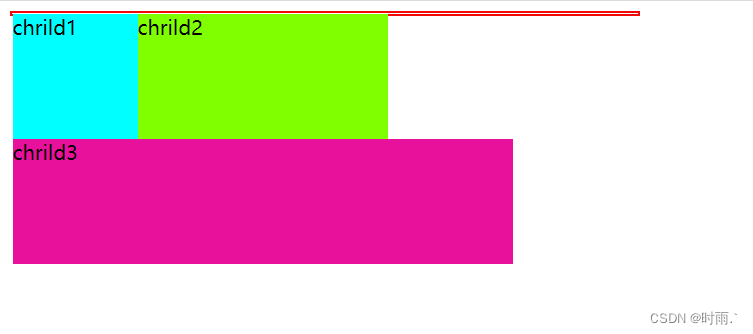
而清除浮动主要是为了解决,父元素因为子级元素浮动引起的内部高度为0的问题,即高度塌陷
下面就是在子元素都添加了浮动后,引起父元素的高度塌陷:
1
2
3
4
5
6
7
8
9
10
11
12
13
14
15
16
17
18
19
20
21
22
23
24
25
26
27
28
29
| <div class="father">
<div class="chrild1">chrild1</div>
<div class="chrild2">chrild2</div>
<div class="chrild3">chrild3</div>
</div>
<style>
.father{
width: 500px;
border: 2px solid rgb(240, 9, 9);
}
.chrild1{
width: 100px;
height: 100px;
background-color: aqua;
float: left;
}
.chrild2{
width: 200px;
height: 100px;
background-color: chartreuse;
float: left;
}
.chrild3{
width: 400px;
height: 100px;
background-color: rgb(231, 17, 156);
float: left;
}
</style>
|
接下来进入正题介绍清除浮动的方法
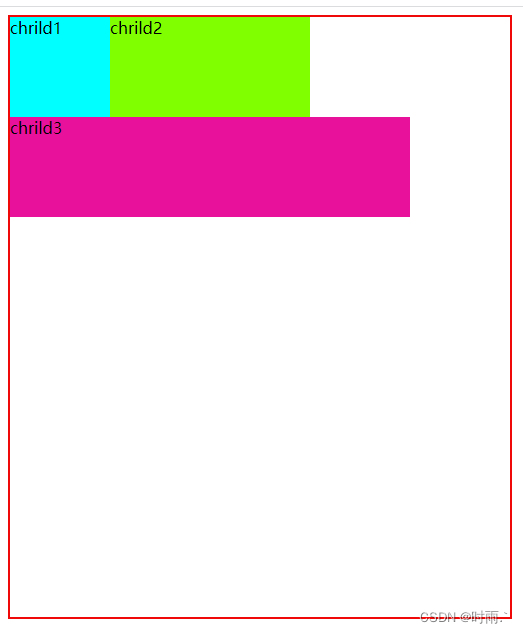
1.给父级元素定义height属性
缺点: 需要手动添加高度,如何后面的高度发生变化,还要再次修改高度,给后期的维护带来麻烦。
1
2
3
4
5
| .father{
width: 500px;
border: 2px solid rgb(240, 9, 9);
height: 600px;
}
|
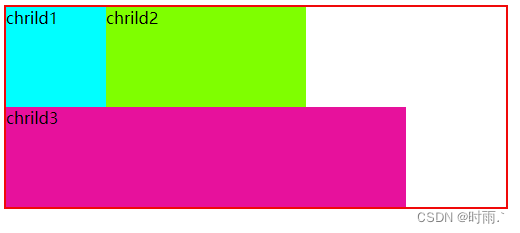
2.最后一个浮动元素之后添加一个空的div标签,并添加clear:both样式
clear:both的作用是不允许周围有浮动现象
缺点:结构化比较差,对于比较复杂的页面就显得结构非常的乱。
1
2
3
4
5
6
7
8
9
10
11
| .chrild4{
clear: both;
}
<div class="father">
<div class="chrild1">chrild1</div>
<div class="chrild2">chrild2</div>
<div class="chrild3">chrild3</div>
<div class="chrild4"></div>
</div>
|
3.触发BFC,在父元素中添加overflow
缺点:内容增多的时候容易造成不会自动换行导致内容被隐藏掉,无法显示要溢出的元素。
1
2
3
4
5
| .father{
width: 500px;
border: 2px solid rgb(240, 9, 9);
overflow: hidden;
}
|
4.使用after伪元素清除浮动(较推荐)
利用after伪元素定义一个clearfix类,浮动元素的父级元素调用此类可以实现清除浮动的效果
1
2
3
4
5
6
7
8
9
10
11
12
13
14
| .clearfix::after {
content: "";
display: table;
height: 0;
clear:both;
visibility: hidden;
}
<div class="father clearfix">
<div class="chrild1">chrild1</div>
<div class="chrild2">chrild2</div>
<div class="chrild3">chrild3</div>
<div class="chrild4"></div>
</div>
|
5.使用后before和after双伪元素清除浮动(较推荐)
1
2
3
4
5
| .clearfix:after,.clearfix:before{
content: "";
display: table;
clear: both;
}
|